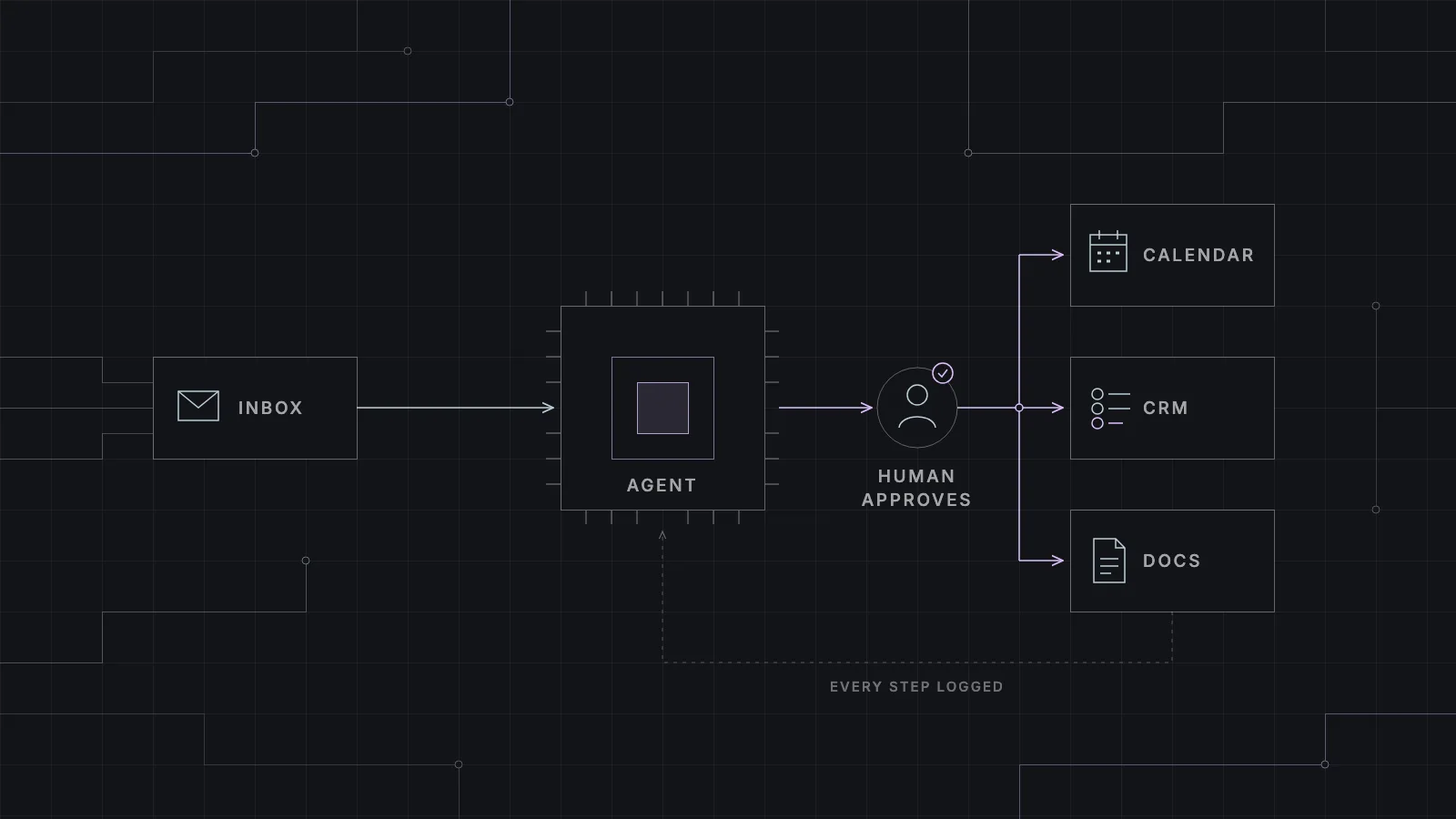
An AI agent is not a chatbot with a new name. It is software that reads what comes in, decides what to do with it, and then does it in the tools you already use.
We build AI agents for small and mid-size businesses, across Europe and the Middle East, most of all in the Netherlands and Dubai. The first question we get is rarely technical. It is usually some version of "is this worth it for a company our size?" Sometimes the answer is yes. Quite often it is "not yet, fix this other thing first". This post is our honest version of that conversation.
What an AI agent actually is
Take away the marketing and an agent does three things in a loop. It reads an input, like an email, a web form, a PDF or a chat message. It decides what that input needs, using a language model plus your rules and your documents. Then it acts. It drafts a reply, creates a record in your CRM, books a slot or files a document.
The step people skip is the one in the middle. A person checks the result where it matters. Not every step. Just the ones where a wrong answer would cost you money or a customer. And everything the agent does goes into a log, so you can always see what it read, what it decided and who approved it.
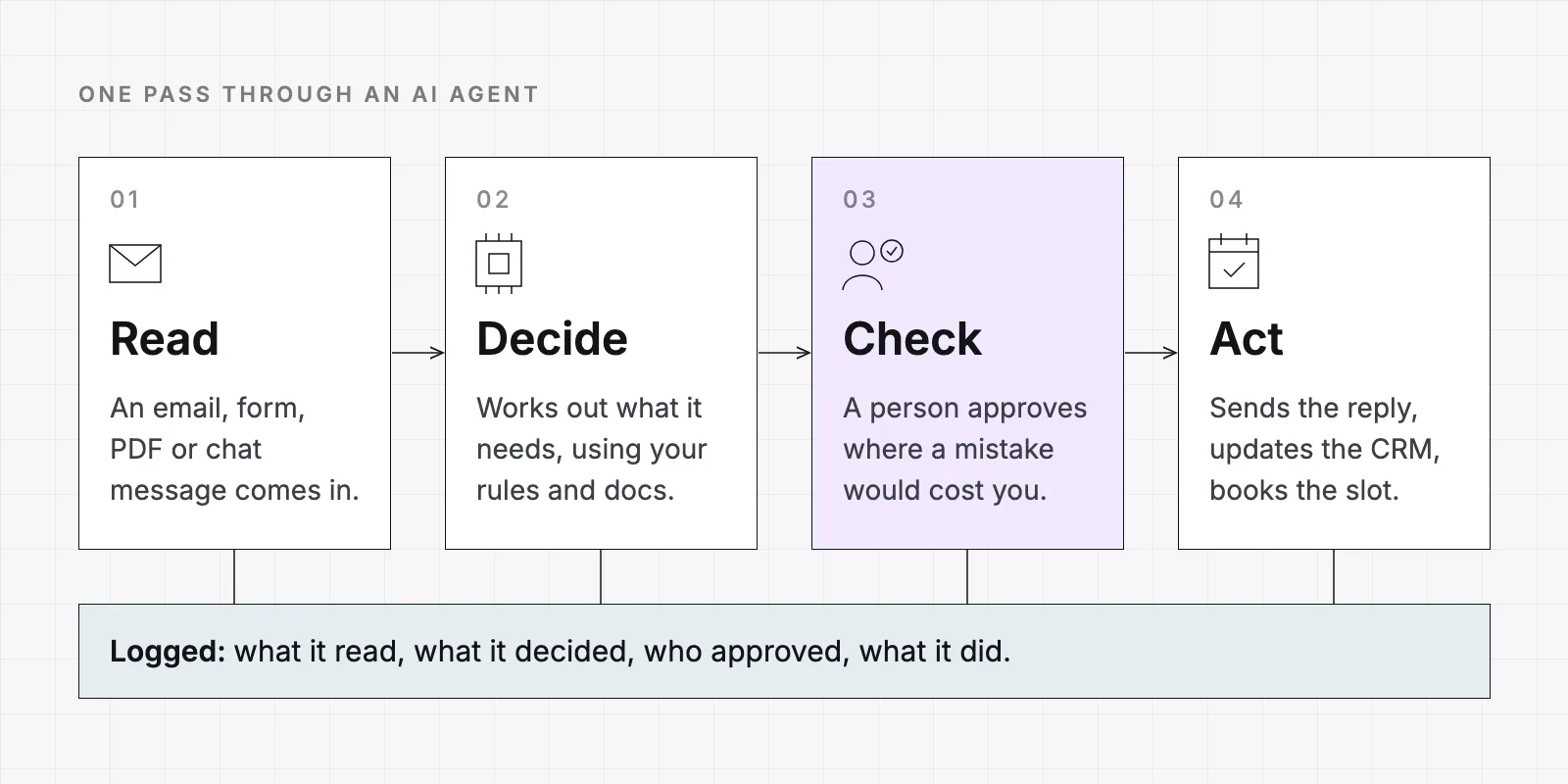
That is the real difference from a chatbot. A chatbot answers questions and stops there. An agent finishes the task inside your systems. Most of what we build under AI services is this kind of thing. It takes a piece of work someone used to do by hand, so now they only need to check and approve it.
Where an agent is worth building
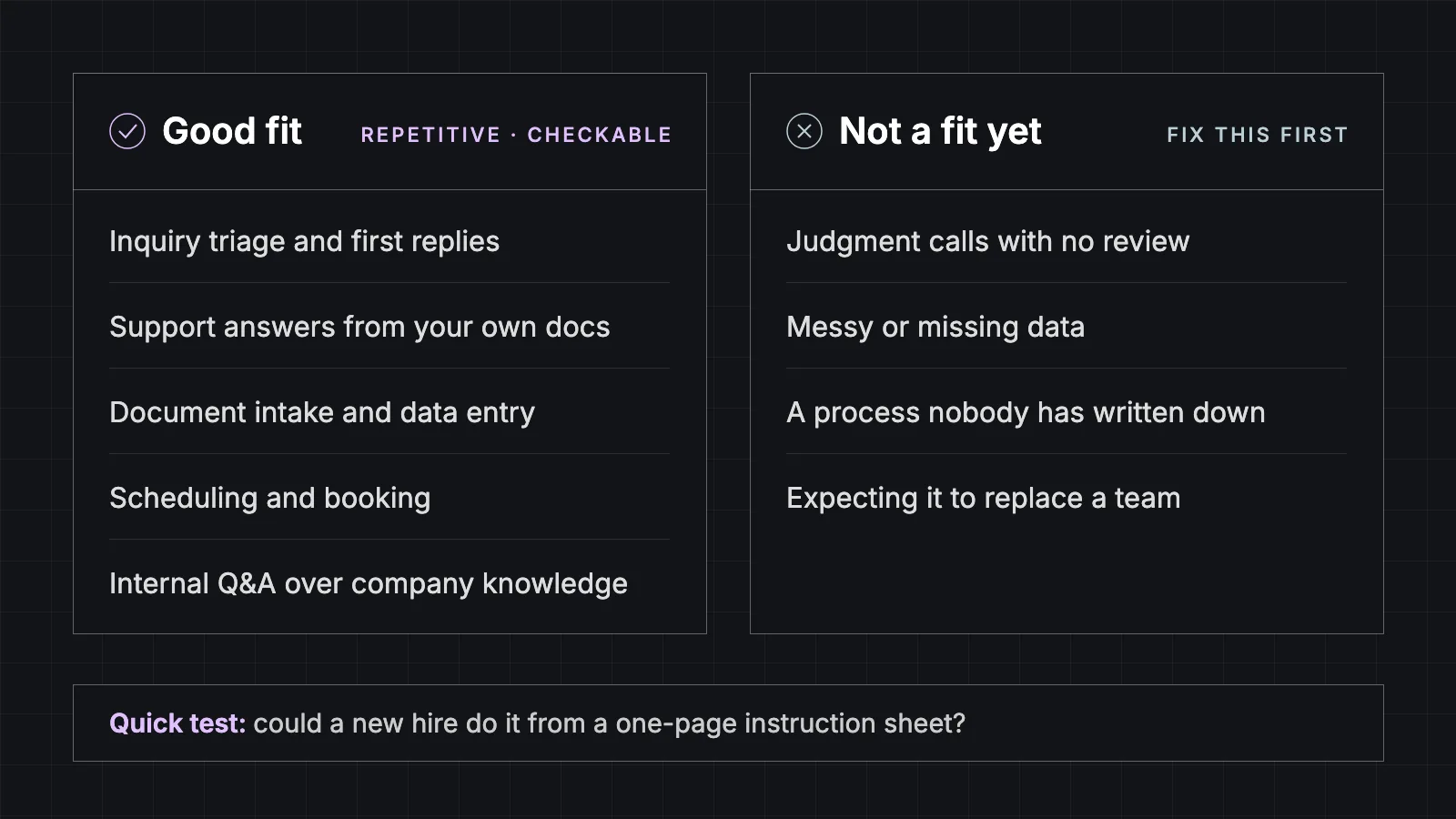
The good fits have three things in common. The work is repetitive. It mostly arrives as text. And the right answer can be checked against something you already have, like a price list, a calendar or a policy document.
Lead and inquiry triage
Inquiries come in through the website form, email and WhatsApp, and someone has to read each one, work out what the person wants and pass it on. An agent can do that sorting, send a first reply that is actually useful, and hand it to the right person with the context attached. We wrote about how this looks for property agencies in what a real estate website should do after the first click.
Support questions answered from your own docs
Most support questions have been answered before. The answer is in a manual, a policy or an old email thread. An agent can answer from your material, and only from your material. If the answer isn't there, it says so and passes the customer to a person. For a dealership that means service questions like "what does this warning light mean", which we covered in our post on dealership websites.
Document intake and data entry
Invoices, contracts, application forms, delivery notes. Someone opens each one and types the same fields into another system. An agent can read the document, pull out the fields, check them against what it expects, and fill in the record. Where accuracy really matters, a person confirms before it is saved.
Scheduling and booking
"Can I come in Thursday afternoon?" sounds simple and still takes three emails. An agent can read the request, check real availability in your calendar or booking system, offer slots and confirm. The key word is real. If it can't see the actual diary, it shouldn't be booking anything.
Internal questions over company knowledge
Not every agent faces customers. A lot of time goes into staff asking each other where a template is, what the refund policy says, or how a certain client is usually invoiced. An assistant that answers from your own documents means people ask it first, instead of interrupting the one colleague who knows.
Where it doesn't work, yet
This is the part most AI pitches leave out. These are the situations where we usually tell people to wait, or to fix something else first.
- Judgment calls with no review. A pricing exception, a complaint with legal weight, a decision about a supplier. An agent can prepare the case. A person should make the call.
- Messy or missing data. If your customer list lives in three spreadsheets that disagree with each other, the agent will disagree with itself too. Sometimes cleaning up the data is the actual project.
- Processes nobody has written down. If two people on your team do the same task two different ways, the agent can't know which one is right. Writing the process down comes first, and it is often useful on its own.
- Expecting it to replace a team. An agent takes the repetitive part off people's plates. It doesn't run the business. If the plan only works when half the office goes away, the plan is going to disappoint you.
How to start small
The projects that go well almost always start with one workflow, not a company-wide AI plan. This is the order we usually suggest.
Pick one workflow
The one that is frequent, repetitive and annoying. Inquiry replies and document intake are common first picks. Not five workflows at once.
Write down how it works today
What comes in, what decisions get made, where the result ends up, and who checks it. This is also where you find out if the process is clear enough to automate.
Build it with an approval step
The agent drafts, a person approves. Nothing goes to a customer or into your books without a click from someone on your team. Everything is logged.
Measure it against how things were
How long replies take, how much gets handled, and how often the person approving had to correct the draft. Use your own numbers from before the agent, not a vendor's benchmark.
Loosen the review only where it's earned
If one type of draft gets approved untouched for weeks, let that type go out on its own. Keep the review on everything else.
We run our own projects in the same shape. A short audit to find and rank the candidates, a prototype on your real data, then a production build that is monitored after launch. You can stop after any stage. For a first workflow it is usually a matter of weeks rather than months, but that depends a lot on how many systems it has to touch.
What goes into AI agent development
The language model is the easy part. Most of the work in a real build is everything around it.
What a production agent needs
- Connections to your systems. Email, CRM, calendar, accounting, document storage. An agent that can't reach where the work happens is just a chat window.
- Permissions. It reads only what the task needs and writes only where you allowed it. No admin keys.
- Guardrails. Clear limits on what it can do without approval, what topics it answers, and when it hands over to a person.
- An audit trail. A log of what it read, what it decided and what it did, so when something looks off you can see why.
- Testing on real examples. A set of past cases it is scored against before launch and after, so you notice if quality slips.
- Cost monitoring. A clear view of what each run costs, so the bill doesn't surprise anyone.
For the connections, we often build MCP servers. MCP (Model Context Protocol) is a standard way to give an AI access to specific actions in your tools, like "look up this order" or "create a draft reply", each with its own permissions. The agent only gets the doors you built for it, not the whole building.
Sometimes the agent also needs a screen of its own, like an approval queue or a small dashboard. That part is custom application development. And if you are building a new product and want AI handling support triage from launch day, that is closer to our agentic development services.
Europe and the Middle East
We work in both regions, most often in the Netherlands and Dubai. The agent itself works the same way everywhere. What changes is the rules around it and the way customers write to you.
Europe, especially the Netherlands
- GDPR applies to every piece of personal data the agent reads, so where data is processed and how long it is kept are design decisions, not an afterthought
- The EU AI Act is part of the picture now. For most small-business agents the practical point is transparency. People should know when they are dealing with AI
- Replies in the customer’s own language, like Dutch and English in the Netherlands, and they have to read like a person wrote them
Middle East, especially Dubai
- Arabic and English, often in the same conversation, so the agent has to handle both without switching modes
- WhatsApp is often the main channel across the region, not email, so that is where the agent needs to work
- Data protection rules differ by country, the UAE included, so we check early where data is stored and processed
Is an AI agent worth it for your business?
If you have one workflow that is repetitive, text-heavy and easy to check, probably yes. Start there, keep a person approving, and measure it against how things were before. If you don't have that workflow, or the data behind it is a mess, an agent won't fix it. It will just make the mess faster.
If you are not sure which side you're on, that is what the audit step in our AI services is for. It is small and time-boxed on purpose, and the result includes the honest answer when automation isn't worth it yet.
Questions we get asked
- Is an AI agent just a chatbot?
- No. A chatbot answers questions. An agent also takes actions in your systems, like creating a CRM record, booking a slot or filing a document, usually with a person approving the steps that matter.
- Do we need a lot of data to start?
- Not a lot, but it needs to be in reasonable shape. The agent needs the documents and records the task actually uses. If those are scattered or contradict each other, sorting that out comes first.
- Will it make mistakes?
- Sometimes, yes. That is why we build in an approval step, keep a log of everything it does, and test it against real past examples before and after launch. The goal is that a mistake gets caught by a person, not by your customer.
- Can it work with the software we already use?
- Usually, yes. Connecting to your existing email, CRM, calendar and documents is most of the work in a build. We don't ask you to replace software that works.
- Does our customer data get sent to an AI company?
- That depends on how it's set up, and it is one of the first things we decide with you. We pick the model and where it runs with your data rules in mind, and we tell you exactly what leaves your systems.
- What does it cost?
- It depends mostly on how many systems the agent has to connect to and how much data preparation is needed. We scope it against one specific workflow rather than quoting blind, and the audit is there so you can find out what is worth building before you commit to a build.